qunitx-cli




Run your JavaScript and TypeScript tests and code in a real browser, from the terminal. qunitx-cli bundles QUnitX tests with esbuild, runs them in headless Chrome, Firefox or WebKit through Playwright, and streams TAP output as they finish. It also provides an advanced terminal REPL that runs in Google Chrome, and you can view the same session from your browser: what you declare at the prompt is live in that page's DevTools.
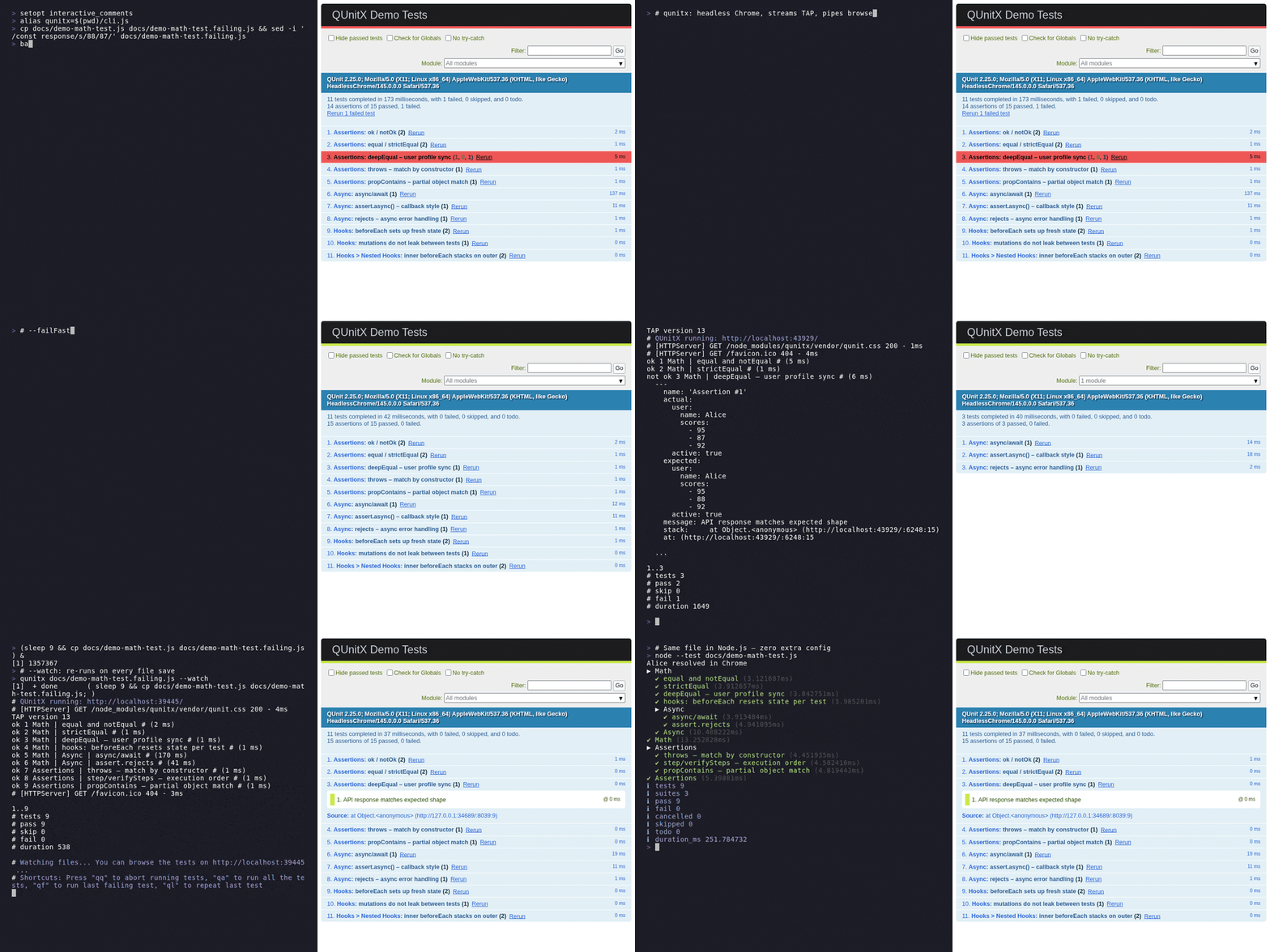
Quick start
curl -fsSL https://raw.githubusercontent.com/izelnakri/qunitx-cli/main/install.sh | sh
export PATH="$HOME/.qunitx:$PATH"
Then, in any project with a package.json:
qunitx new test/example-test.js   # writes a sample test
qunitx test/                      # runs everything under test/
It needs Chrome or Chromium on your PATH (or CHROME_BIN pointing at one), and nothing else.
Rather use npm? npm install --save-dev qunitx-cli, then npx qunitx test/. Every other way in is
under Installation.
Contents
- Features
- Installation · Upgrading
- Writing tests · Usage · CLI reference
- Configuration · Environment variables · JSX / TSX · esbuild plugins
- REPL · Running a script · JavaScript API · Daemon mode
- JUnit reports · Code coverage · Timezone
- Development
Features
Running tests
- Runs
.js,.ts,.jsx, and.tsxtest files in headless Chrome, Firefox, or WebKit (Playwright + esbuild) - TypeScript and JSX work with zero configuration — esbuild handles transpilation, including the React 17+ automatic JSX runtime
- Bring your own esbuild plugins through
package.jsonfor.vue,.svelte, and other custom loaders - Inline source maps for accurate stack traces pointing to original source files
- Concurrent mode (default) splits test files across all CPU cores for fast parallel runs
--watchmode re-runs affected tests on file change--browserflag to run tests in Chromium, Firefox, or WebKit--before/--afterhook scripts for server setup and teardown--timeoutcontrols the maximum ms to wait for the full suite to finish--port/-pdefaults to 1234 and auto-increments if taken; fails fast if an explicit port is unavailable- Optional daemon mode (
qunitx daemon start) keeps Chrome and the esbuild context warm across runs — roughly halves the wall-clock time of repeated invocations - Docker image for zero-install CI usage
Choosing what runs
--failFaststops the run after the first failing test--only-failed/-fre-runs only the test files that failed on the previous run (cached intmp/.qunitx-last-failures.json)--filter/-t/--module/-m/-n— one test filter, five spellings, matched against"Module: test name": substring,/regex/,/regex/i, or!to invert--search/-s/--print/--previewlists the tests a filter matches and exits, without running them (no browser — instant)file.ts#34/file.ts:34runs just the test at that line — or the whole module, when the line is amodule(...)
Output
- Streams TAP-formatted output to the terminal in real time
--reporterpicks the stdout format:tap(default),spec,dot, orgithub(annotates failures on the PR diff)--junitwrites a JUnit XML report for CI dashboards, alongside the normal terminal output--coveragereports V8 line coverage (terminal summary, plus optionallcovandhtmlreports)--debugprints the local server URL and pipes browser console to stdout--open/-oopens the test output in the same browser the tests run in as soon as the bundle is ready;--open=braveopens in a specific binary instead--version/-vprints the installed version
Beyond the test run
qunitx repl— a prompt that evaluates in a real Chrome page: the DOM,fetch, andtest(...)running for real as you type- JavaScript API —
await test('test/')returns the results as data,await run('seed.ts')executes one script; silent by default, withwatch,search, custom reporters and daemon control. On npm and JSR (jsr:@izelnakri/qunitx-cli/api) qunitx run <file>runs one file as a plain script in a real page — top-levelawait, a DOM,fetchagainst a real origin
Installation
Standalone binary (recommended)
No Node or Deno needed to run it:
curl -fsSL https://raw.githubusercontent.com/izelnakri/qunitx-cli/main/install.sh | sh
export PATH="$HOME/.qunitx:$PATH"   # add this to your shell profile
| Platform | Notes |
|---|---|
| Linux x64 / arm64 | glibc 2.27 or newer — any mainstream distribution |
| Alpine and other musl, x64 / arm64 | picked automatically; install a browser first: apk add chromium curl |
| macOS arm64 | |
| Windows x64 / arm64 | from Git Bash or MSYS2 |
Pin a version or install somewhere else:
curl -fsSL https://raw.githubusercontent.com/izelnakri/qunitx-cli/main/install.sh \
  | VERSION=v0.37.0 INSTALL_DIR=$HOME/.local/bin sh
npm
Requires Node.js 24 or newer.
npm install --save-dev qunitx-cli
npx qunitx test/
Deno
Requires Deno 2.7 or newer. Fetches the matching prebuilt binary on first run and caches it under
~/.cache/qunitx/:
deno install -Agf jsr:@izelnakri/qunitx-cli
Docker
docker run --rm -v "$(pwd):/code" -w /code ghcr.io/izelnakri/qunitx-cli:latest npx qunitx test/
Nix
nix profile install github:izelnakri/qunitx-cli
Browsers
Chromium, the default, is whichever Chrome or Chromium is on your PATH; set CHROME_BIN to use a
specific one. Firefox and WebKit run through Playwright's own builds, installed once:
npx playwright install firefox
npx playwright install webkit
Upgrading
qunitx upgrade           # standalone binary: fetch the latest release, verify its sha256, replace itself
qunitx upgrade --check   # report only — exits 1 when a newer version exists
qunitx upgrade 0.34.2    # install that version instead
The standalone binary replaces itself. A global install — deno install from JSR, or
npm install -g — is owned by another installer, so upgrade runs that installer for you:
$ qunitx upgrade 0.35.0
Upgrading via the JSR launcher's cached binary:
  deno install -Agf jsr:@izelnakri/qunitx-cli@0.35.0
qunitx 0.34.6 → 0.35.0
A project dependency is different: bumping it edits your package.json or deno.json, which is
a change to your repository rather than to a tool you installed. Those print the command instead,
and qunitx upgrade --write-manifest bumps the range for you if you want that part done — the
install stays yours to run. A source checkout prints git pull, and a deno run npm:qunitx-cli
installed nothing to upgrade.
Set QUNITX_NO_SELF_UPGRADE=1 to make upgrade never run another installer, printing the command
it would have run instead.
Writing tests
qunitx-cli runs QUnitX tests — a superset of QUnit with async hooks, concurrency control, and test metadata.
Migrating from QUnit? Change a single import:
// before
import { module, test } from 'qunit';
// after
import { module, test } from 'qunitx';
Example test file — ES modules, npm imports, and nested modules all work out of the box:
// some-test.js (TypeScript is also supported)
import { module, test } from 'qunitx';
import $ from 'jquery';

module('Basic sanity check', (hooks) => {
  test('it works', (assert) => {
    assert.equal(true, true);
  });

  module('More advanced cases', (hooks) => {
    test('deepEqual works', (assert) => {
      assert.deepEqual({ username: 'izelnakri' }, { username: 'izelnakri' });
    });

    test('can import ES & npm modules', (assert) => {
      assert.ok(Object.keys($));
    });
  });
});
Run it:
# Headless Chromium (default, recommended for CI)
qunitx some-test.js

# With browser console output
qunitx some-test.js --debug

# TypeScript — no config needed
qunitx some-test.ts
Usage
# Single file
qunitx test/my-test.js

# Multiple files / globs
qunitx test/**/*.js test/**/*.ts

# TypeScript — no tsconfig required
qunitx test/my-test.ts

# A URL, fetched and bundled like a local file — relative imports resolve on the server,
# and `import { test } from 'qunitx'` still means the runtime running it
qunitx https://example.com/tests/cart-test.js

# A URL glob or directory, expanded against the server's own listing: a JSON array of
# names (the GitHub contents API shape included), or an HTML autoindex. Quote it, or the
# shell will try to expand it first.
qunitx 'https://example.com/tests/**/*-test.js'
qunitx https://example.com/tests/

# Watch mode: re-run on file changes
qunitx test/**/*.js --watch

# Stop on the first failure
qunitx test/**/*.js --failFast

# Re-run only the files that failed last time (from the persistent failure cache)
qunitx test/ --only-failed   # or: -f, --failed

# Filter by name. -t, --filter, -m and --module are FOUR SPELLINGS OF ONE FLAG:
# all match against "Module: test name", so they find modules and test names alike.
qunitx test/ -t 'renders the header'
qunitx test/ -m Cart              # everything under/named Cart (substring)
qunitx test/ -t Coupons           # finds a nested module by its own name

# Values may be unquoted and multi-word, up to the next flag:
qunitx test/ -m Cart checkout           # filter "Cart checkout"
qunitx -t adds to cart --reporter=spec  # filter "adds to cart", then --reporter
# The value is greedy, so put file targets BEFORE the filter, or after `--`:
qunitx -t adds to cart -- test/cart     # filter "adds to cart", target test/cart

# Substring is case-INsensitive; a regex is case-SENSITIVE unless you add /i:
qunitx test/ -t cart        # matches Cart, ShoppingCart, CartItem, Cart checkout
qunitx test/ -t '/cart/'    # matches nothing — regexes are case-sensitive
qunitx test/ -t '/cart/i'   # matches all of them again
qunitx test/ -t '!slow'     # invert (also works as !/regex/)

# EXACT MODULE: to match one module and its children but NOT its lookalikes
# (ShoppingCart, CartItem, Cart checkout), anchor with ^ and require ": " or " > ":
qunitx test/ -t '/^Cart(:| >)/'   # Cart + Cart > Coupons only
qunitx test/ -t '/^Cart: /'       # Cart's own tests, without nested children

# Preview what a filter matches WITHOUT running anything (no browser — instant).
# Each line is the QUnit name plus a location you can paste back as a line target.
qunitx test/ --print              # list every test
qunitx test/ -s Cart              # list what `-t Cart` would run
#   Cart: adds item               test/cart-test.ts#4
#   Cart > Coupons: applies code  test/cart-test.ts#6
#   2 of 5 tests match "Cart" in 1 file

# Run the test at a line — paste a location straight from a stack trace
qunitx test/cart-test.ts#34   # or: test/cart-test.ts:34

# Print the server URL and pipe browser console to stdout
qunitx test/**/*.js --debug

# Open output in the test browser as soon as the bundle is ready
qunitx test/**/*.js --open

# Open output in a specific browser binary instead
qunitx test/**/*.js --open=brave
qunitx test/**/*.js --open=google-chrome-lts

# Custom timeout (ms)
qunitx test/**/*.js --timeout=30000

# Run a setup script before tests (can be async — awaited automatically)
qunitx test/**/*.js --before=scripts/start-server.js

# Run a teardown script after tests (can be async)
qunitx test/**/*.js --after=scripts/stop-server.js

# Run in Firefox or WebKit instead of Chromium
qunitx test/**/*.js --browser=firefox
qunitx test/**/*.js --browser=webkit
Firefox and WebKit need Playwright's browser builds installed once — see Browsers.
Remote inputs
A http:// or https:// input is fetched rather than read. Everything downstream is the same
run: the bundle, the browser, the reporters, -t, --search, #34 line targets and
--only-failed all treat a URL as the path it is.
| shape | what it means |
|---|---|
https://x/tests/a-test.js |
that one file |
https://x/tests/ or https://x/tests |
every test file under it, recursively |
https://x/tests/*-test.js |
the matches beside it |
https://x/tests/**/*-test.{js,ts} |
and everything below |
https://x/tests/a-test.js#34 |
just the test on line 34 — #, never :, which is a port |
qunitx run and qunitx repl take a URL as well — the browser equivalent of deno run https://…, and a prompt with a remote helper already in scope:
qunitx run https://example.com/scripts/seed.js
qunitx repl https://example.com/tests/helpers.js
At the prompt, .import https://example.com/tests/helpers.js and a typed
import { a } from 'https://example.com/tests/helpers.js' both work too.
A QUnit runner page runs where it stands — nothing is bundled. qunitx opens the page, hooks QUnit before the page's own scripts run, and reports what QUnit reports.
qunitx https://izelnakri.github.io/qunitx-cli/tests/  # this project's own suite, as a page
qunitx https://objectmodel.js.org/test/               # 90 tests, reported as any other suite
qunitx 'https://x/test/?moduleId=6e15ed5f'            # QUnit's own URL filters still apply
qunitx https://x/test/ -t 'Set Models'                # and `-t` becomes QUnit's `filter`
A page is a whole suite, so it runs alone: passing one alongside other inputs is refused, and
--watch has nothing to watch.
That first page is this project's own: --output leaves a standalone page behind every run, and
CI publishes the one from test/browser-suite.ts to GitHub Pages — copy
the pages job in ci.yml to publish yours the same way.
A glob needs the server to list its directories: a JSON array of names, a JSON array of
{ name, type } (what the GitHub contents API answers), or an HTML autoindex (what nginx, Caddy
and python -m http.server give for free). A server that will not be listed says so by name. The
walk stays inside the tree it was pointed at, and stops at 10 levels or 1,000 files.
Two things a remote input cannot join in on, both because it is not on this disk: --watch has
nothing to watch, and --changed/--since compare against your working tree, which a remote file
can never be part of.
Remote code is fetched and executed in the browser, exactly as the URL asked. Point it at suites you would run anyway.
Configuration
All CLI flags can also be set in package.json under the qunitx key, so you don't have to repeat them on every invocation:
{
  "qunitx": {
    "inputs": ["test/**/*-test.js", "test/**/*-test.ts"],
    "htmlPaths": ["test/tests.html"],
    "extensions": ["js", "ts", "jsx", "tsx"],
    "output": "tmp",
    "timeout": 20000,
    "failFast": false,
    "port": 1234,
    "browser": "chromium",
    "plugins": []
  }
}
| Key | Default | Description |
|---|---|---|
inputs |
[] |
Glob patterns, file paths, or directories to use as test entry points. Merged with any paths given on the CLI. |
htmlPaths |
[] |
Optional HTML templates to run tests inside. Any listed .html file that contains {{qunitxScript}} or other handlebars-style tokens is treated as a test runner template. |
extensions |
["js", "ts", "jsx", "tsx"] |
File extensions tracked for test discovery (directory scans) and watch-mode rebuild triggers. Add "mjs", "cjs", or any other extension your project uses. |
output |
"tmp" |
Directory where compiled test bundles are written. |
timeout |
20000 |
Maximum milliseconds to wait for the full test suite before timing out. |
failFast |
false |
Stop the run after the first failing test. |
port |
1234 |
Preferred HTTP server port. qunitx auto-selects a free port if this one is taken. |
browser |
"chromium" |
Browser engine to use: "chromium", "firefox", or "webkit". Overridden by --browser on the CLI. |
plugins |
[] |
esbuild plugin specifiers loaded from your node_modules and applied to the test bundle. See esbuild plugins. |
CLI flags always override package.json values when both are present.
Custom HTML template
If you do not provide any HTML template, qunitx falls back to its built-in test/tests.html boilerplate internally, so qunitx init is optional.
You can also pass a custom HTML file on the CLI:
qunitx test/**/*.js custom.html
If that file contains {{qunitxScript}}, qunitx injects the runner script block at that exact spot. If it contains other handlebars-style tokens (e.g. {{applicationName}}), qunitx still treats it as a custom runner template and injects the runner before </body>.
The {{qunitxScript}} placeholder is replaced with a <script> tag containing the WebSocket runtime, QUnit event hooks, and the bundled test code.
Environment variables
| Variable | Description |
|---|---|
CHROME_BIN |
Path to the Chrome/Chromium executable. Required on systems where Chrome is not on PATH (e.g. many CI environments). Set automatically when using browser-actions/setup-chrome in GitHub Actions. |
QUNITX_BROWSER |
Browser engine to use (chromium, firefox, webkit). Equivalent to --browser on the CLI. Useful in CI matrix jobs. |
NODE_COMPILE_CACHE |
Standard Node env, auto-enabled by qunitx. Stores V8 bytecode for the CLI + its dep graph on disk so the second and subsequent qunitx runs skip the parser pass — measured ~8% faster end-to-end (more on slow CI disks). Defaults to ${TMPDIR}/node-compile-cache; set to a path to relocate (handy for a CI cache key) or "" to disable. |
JSX / TSX
.jsx and .tsx files are picked up automatically — no configuration needed. The bundle uses esbuild's automatic JSX runtime so React 17+ "no import React" code just works:
// test/button-test.tsx
import { module, test } from 'qunitx';
import { flushSync } from 'react-dom';
import { createRoot } from 'react-dom/client';
import { Button } from '../src/button.tsx';

module('Button', (hooks) => {
  let container;
  hooks.beforeEach(() => {
    container = document.createElement('div');
    document.body.appendChild(container);
  });
  hooks.afterEach(() => container.remove());

  test('renders the label', (assert) => {
    flushSync(() => createRoot(container).render(<Button label="Save" />));
    assert.equal(container.querySelector('button').textContent, 'Save');
  });
});
Vue, Preact, Solid, and other JSX dialects work via a one-line override at the top of each file:
/** @jsxImportSource vue */
import { createApp } from 'vue';
// ...JSX uses vue/jsx-runtime instead of react/jsx-runtime
You can also set compilerOptions.jsxImportSource in your tsconfig.json to apply the override across a directory.
esbuild plugins
For file formats esbuild does not handle natively (e.g. .vue SFCs, .svelte), declare plugin specifiers in package.json#qunitx.plugins. qunitx dynamic-imports each one from your project's node_modules and passes it to the build:
{
  "qunitx": {
    "extensions": ["js", "ts", "jsx", "tsx", "vue"],
    "plugins": [
      "esbuild-plugin-vue-next",
      ["esbuild-svelte", { "compilerOptions": { "css": "injected" } }]
    ]
  }
}
Each entry is one of:
| Form | Behavior |
|---|---|
"<package-name>" |
Imports the package. If the default export is a function, it's called with no arguments to produce the plugin; otherwise the export is used as the plugin. |
["<package-name>", <options>] |
Same, but the factory is called with <options> as its only argument. Use this form to pass plugin-specific configuration. |
"./relative/plugin.js" |
Loads a plugin you wrote yourself. Resolved against the project root (where your package.json lives). |
Don't forget to add the plugin's file extension(s) to qunitx.extensions so directory scans and watch-mode rebuilds pick them up.
REPL
qunitx repl opens a prompt whose evaluation happens in the browser page, not in Node. The
DOM, fetch, timers and QUnit are all the real ones.
qunitx repl                      # a bare page with the qunitx runtime loaded
qunitx repl test/helpers.ts      # …plus that file: exports become globals (and `Helpers`), tests run once
qunitx repl --open               # …in a window you can see (not macOS: it says so and stays headless)
> document.body.appendChild(Object.assign(document.createElement('p'), { textContent: 'hi' }))
<p>hi</p>
> (await fetch('/tests.js')).status
200
> test('adds', (a) => a.equal(1 + 1, 2))
ok 1 adds # (2 ms)
TypeScript works at the prompt: a line the engine cannot parse is retried with its types taken off,
so const port: number = 1234 binds and interface/type/as are erased the way a build erases
them. Nothing is stripped until something fails, so plain JavaScript pays nothing for it.
Tests typed at the prompt run immediately and report as TAP, through the same reporters a run uses
(--reporter=spec works here too). Bindings persist between lines, await works at the top level,
and .help lists the commands — or documents the one you name, which is what .h does too
(.scope shows what you have declared, .view prints a file
numbered or a directory as a tree, .ls -L 2 limits the depth, .history shows the last lines,
.import lib/a.ts brings a file in as A plus its exports — JSON parsed, anything else as text,
and a plain import { a } from './a.ts' works too — .imported names what each file brought,
.type says what a value's type is, .doc shows a value's signature, where it is written and the
comment above it, .view <value>
(or .v) shows the whole of it, .copy puts it on the clipboard, .open with nothing after it is
a scratch buffer that runs what you save — with a value, a path or a URL after it, it opens that,
the way xdg-open would, and saving a file the session had loaded loads it again — .search finds
tests by name, .reload evaluates every module again and drops what you typed, .url prints the
server URL, and .devtools opens
Chrome's own DevTools on the very page the prompt is driving). That last one is <url>/repl in
any Chromium browser: same realm, same DOM, same paused frame — a value declared at the prompt is
in that console, and a debugger shows as paused in both.
HTTP from the prompt. .get, .post, .put, .patch and .delete request a URL. A path is
the page's own server — .get /api/users hits the suite's origin — :4000 is that port on this
machine, and anywhere else takes an http://. A body is JavaScript, evaluated in the page: an
object literal, a variable, an instance with a toJSON — and after a .get, which has no body,
an object is the query instead ({ page: 2 } is ?page=2). The request itself is made from Node
rather than the tab, so nothing is hidden by CORS and what went out can be reported honestly.
> .post :4000/api/users { name: 'Ada' }   # a body after the URL, `@file` to send one, `:` to edit one
 201 Created  · 26 bytes · 13ms | POST http://localhost:4000/api/users | #1
> .header sent                            # what went out; `.header received` for the reply
> .request #1 body                        # the whole body, however long — `.request 2` counts back
> .request list                           # every request this session has made, newest first
A session starts with the two headers a browser would send — its own user-agent, and JSON for the
accept — and .header list shows them, so nothing is sent that you cannot see.
The line is syntax-highlighted as you type and what it comes to is shown on the right; TAB completes
against the page, Ctrl-F takes the greyed-out suggestion, and Ctrl-C interrupts a runaway
expression. A debugger statement stops the page — .locals shows the frame, .continue carries
on. Colours follow your terminal, and QUNITX_REPL_THEME='@string=fg=green' overrides them under
nvim's treesitter names. Piped input works, so echo '1+1' | qunitx repl is a scriptable browser
probe. Chromium only — it evaluates over the Chrome DevTools Protocol.
→ Testing the REPL by hand — every feature in the order it makes sense to try it, with the output you should get. Most of what a prompt does is only provable by typing at one.
Running a script
qunitx run <file> runs a single file as a plain script instead of a test suite — the browser
equivalent of deno run. No TAP, no QUnit, no test declarations required; the script's own
console output is the output.
$ qunitx run scripts/seed.ts
seeded 42 rows
The script is bundled with esbuild (TypeScript and JSX work unchanged) and evaluated as a module
in a real page, so it gets a DOM, fetch against a real http://localhost origin, import.meta,
and top-level await. console.log/info/debug go to stdout, warn/error to stderr, in
the order the page emitted them.
It finishes when the script's top level settles — set globalThis.exitCode to choose the exit
code, or throw to exit 1 with a source-mapped stack trace:
const response = await fetch('/api/health');
if (!response.ok) {
  globalThis.exitCode = 1;
}
--browser, --port, --open, --timeout and --watch work here too (--watch re-runs the
script on every save).
Point it at a test file and it runs the tests
A file that registers QUnit tests is a suite, whichever verb you used to reach it — so run runs
it as one, reporting exactly what the bare form reports:
$ qunitx run test/cart-test.ts
TAP version 13
# Running 1 test file across 1 group
ok 1 Cart | sums line items # (2 ms)
1..1
It says so, and names the shorter way to have asked:
# Warning: ran as a suite (declares tests); globalThis.exitCode is ignored. Prefer: qunitx test/cart-test.ts
The tests decide the exit code: a failing one exits 1 even if the file set globalThis.exitCode = 0,
and a passing suite exits 0 whatever the file set. --reporter, --junit, --filter and --debug
all apply. Nothing is bundled or evaluated twice:
the file is evaluated once, and whether it declared any tests is read from QUnit afterwards — so a
test file that reaches qunitx through a barrel or a helper is recognised just the same.
The alternative was to run it as a script, which registers the tests, runs none of them, and exits 0 in silence. Reporting success for tests that never ran is the one thing a test runner must not do.
JavaScript API
Everything the CLI does, available as a function — for CI scripts, editor integrations, agents, and anything else that needs the results as data rather than as text on a terminal.
import { test } from 'qunitx-cli';

const result = await test('test/');

result.ok; // false
result.counts; // { total: 42, passed: 41, failed: 1, skipped: 0, todo: 0, assertionsFailed: 1 }
result.failures.map((one) => one.fullName); // ['Cart > Coupons: applies code']
test(options) |
run the suite once; the full result as a value |
run(file, options) |
run ONE file as a plain script; its exit code as a value |
openSession(options) |
one run, watched as it happens — events(), result(), abort() |
watch(options) |
async-iterable session; run/runAll/runFailed/abort, results() |
search(options) |
what a selection would run — no browser, milliseconds |
repl(options) |
a live page you can eval(...) against |
Daemon.{start,stop,status,test} |
reuse a warm browser between runs |
init / generate |
scaffolding, reporting what they wrote |
validate(options) |
reject bad options without launching anything |
Upgrading: the suite verb used to be
run(options)and is nowtest(options);runis the script verb, mirroringqunitx run <file>. Passing a directory, a glob, an array or an options object torunis refused with a message namingtest(), so the change cannot pass silently.
Four things to know:
- Nothing is printed unless you ask. The returned result is the whole answer. Pass
reporter: 'tap'(or'spec','dot','github') to get the CLI's output too. - Failing tests are not an error.
test()resolves withok: false. It rejects only when the run could not happen — a bad option, an unreadable input, nopackage.json. - It is lazy. These return a
Task(a Promise superset), so nothing starts until youawait. - It is the same engine as the CLI, taking the same code path, so behaviour cannot drift.
→ Full JavaScript / TypeScript API documentation — every verb and option, the result shape, notices, custom reporters (with a nyan cat reporter tutorial), Streams, errors, Deno and JSR.
Daemon mode
qunitx daemon start is optional. Set QUNITX_DAEMON=1 once (in your shell, .env, or a CI step) and plain qunitx <file> invocations auto-spawn the daemon on first use, then transparently route through it on every run after — no extra commands, no flags, nothing to remember between invocations. The explicit daemon start / stop subcommands exist only for when you want to control the lifecycle yourself.
What it does: cold-start cost dominates a single qunitx run — launching Chrome, loading playwright-core, and creating an esbuild incremental context together account for most of the wall-clock time on a small suite. The daemon keeps all three resources alive across runs so subsequent invocations skip them entirely — roughly 2-3× faster on repeated runs of the same suite.
A single one-off run won't get faster from spinning the daemon up; it's an opt-in optimization aimed at two situations:
- Local TDD loops. Export
QUNITX_DAEMON=1in your shell profile (or runqunitx daemon startonce at the top of your session) and forget about it — subsequent runs reuse the daemon automatically until youdaemon stopor 30 idle minutes pass. Override the idle window withQUNITX_DAEMON_IDLE_TIMEOUT(1h,45s,500ms; bare numbers are minutes), or set it tofalseto disable auto-shutdown entirely. - Monorepo CI where each package shells out to
qunitxseparately. SetQUNITX_DAEMON=1for the job and a single daemon is auto-spawned and reused across every package's invocation.
# Start a background daemon for this project
qunitx daemon start

# Run tests as usual — the cli auto-detects the daemon and routes through it
qunitx test/**/*.ts

# Stop it when you're done
qunitx daemon stop
--watch and --open manage their own browser lifecycle and bypass the daemon automatically. Single-invocation CI jobs (where CI=1 is set) also bypass it by default — QUNITX_DAEMON=1 overrides if you want it on anyway.
Daemon subcommands
qunitx daemon start    # Launch a detached daemon for this cwd (idempotent)
qunitx daemon stop     # Ask the running daemon to exit and wait until it has
qunitx daemon status   # Print the live daemon's pid, socket, and uptime
qunitx daemon restart  # Stop + start in one step
How it works
qunitx daemon start spawns a detached Node process listening on a per-project Unix socket (named pipe on Windows). Subsequent qunitx invocations detect the live socket and forward argv + cwd + env to the daemon; the daemon executes the run in-process and streams TAP back to your terminal. Ctrl+C is forwarded — the daemon abandons the in-flight run cleanly and stays up for the next one. A single daemon serves one run at a time; concurrent invocations queue in arrival order.
Running qunitx daemon start upfront is optional. With QUNITX_DAEMON=1 set in your environment, a plain qunitx <file> invocation will spawn the daemon on its own when it doesn't find one already running — so the very first run pays the spawn cost and every run after that is warm. Without QUNITX_DAEMON=1, the cli skips auto-spawn and just runs locally; qunitx daemon start then becomes the explicit way to opt in.
Debugging the daemon
The daemon process is detached with stdio: 'ignore', so its idle/startup/shutdown output never reaches a terminal. Set QUNITX_DAEMON_LOG=<path> before daemon start to redirect the daemon's stdout + stderr to a file:
QUNITX_DAEMON_LOG=/tmp/qunitx-daemon.log qunitx daemon start
tail -f /tmp/qunitx-daemon.log
The log captures startup banners, browser-crash recovery, idle-timeout shutdown, package.json-mutation restarts, and any unhandled rejection. During an active run the per-run interceptor still forwards stdout to the client; the log catches everything else.
JUnit reports
Most CI dashboards ingest JUnit XML but not TAP. --junit writes one in addition to the
terminal output, so --reporter keeps owning stdout.
qunitx test/ --junit                    # writes tmp/junit.xml
qunitx test/ --junit=reports/junit.xml  # custom path
- One
<testsuite>per QUnit module; each test is a<testcase>. - Failures carry a
<failure>with the message and a stack mapped back to your source. - Skipped and
todotests are reported as<skipped/>. - Settable as
junitunderqunitxinpackage.json.
Code coverage
--coverage collects V8 line coverage of your test bundle over the Chrome DevTools Protocol
and maps it back through the bundle's source map to your original files. Because everything is
bundled, only the non-test source your tests actually import is reported — test files and
node_modules are excluded, and code eliminated by tree-shaking (never shipped to the browser)
does not appear.
qunitx test/                    # terminal summary only
qunitx test/ --coverage=lcov    # + tmp/coverage/lcov.info  (Codecov, Coveralls, GitLab, genhtml)
qunitx test/ --coverage=html    # + tmp/coverage/index.html (self-contained, line-highlighted)
qunitx test/ --coverage=lcov,html
- Chromium only — Firefox/WebKit runs print a warning and skip coverage.
- The terminal summary is always printed when
--coverageis on;lcov/htmlare additive. - Reports are written under
<output>/coverage/.
Timezone
The browser inherits the OS system timezone automatically — no Playwright timezoneId option is involved. The browser's Intl.DateTimeFormat().resolvedOptions().timeZone will match the timezone that Node.js itself reads from the OS.
Setting a timezone for tests
| Platform | How Chrome resolves the timezone | Override |
|---|---|---|
| Linux | glibc reads TZ env var first, then /etc/localtime |
TZ=America/New_York npx qunitx … works |
| macOS | CoreFoundation reads the system timezone (ignores TZ) |
Must set the system timezone: sudo systemsetup -settimezone America/New_York |
| Windows | Reads the registry timezone (ignores TZ) |
Must set the system timezone: tzutil /s "Eastern Standard Time" |
On Linux, the TZ env var is the simplest way to run tests in a specific timezone:
TZ=UTC npx qunitx test/**/*.ts
TZ=America/Los_Angeles npx qunitx test/**/*.ts
TZ=Europe/Berlin npx qunitx test/**/*.ts
CI pitfalls
GitHub Actions (and most CI providers) run with UTC by default on all platforms. This is usually what you want for reproducible test results. If your tests assert on specific local times or date formatting, be aware:
Linux CI — override with TZ in your workflow step:
- run: npx qunitx test/**/*.ts
  env:
    TZ: America/New_York
macOS CI — TZ does not affect Chrome. Set the system timezone before running tests:
- run: sudo systemsetup -settimezone America/New_York
- run: npx qunitx test/**/*.ts
Windows CI — same constraint, use tzutil:
- run: tzutil /s "Eastern Standard Time"
- run: npx qunitx test/**/*.ts
If your test suite does not assert on local times or timezone-sensitive date formatting, none of this matters — the default UTC CI timezone is fine.
Mocking dates and times in tests
For most cases you do not need to touch system settings or env vars at all. Date, Intl, and timers are plain browser globals — mock them in a qunitx before / beforeEach hook just like any other value:
// test/some-test.ts
import { module, test } from 'qunitx';

module('Invoice formatting', (hooks) => {
  let realDate;

  hooks.before(() => {
    realDate = globalThis.Date;
    // Pin "now" to a fixed instant for the whole module
    const FIXED = new realDate('2024-06-01T12:00:00Z');
    globalThis.Date = class extends realDate {
      constructor(...args) {
        super(args.length ? args : [FIXED]);
      }
      static now() {
        return FIXED.getTime();
      }
    };
  });

  hooks.after(() => {
    globalThis.Date = realDate;
  });

  test('formats the current date correctly', (assert) => {
    assert.equal(new Date().toISOString().slice(0, 10), '2024-06-01');
  });
});
For richer control over timers (setTimeout, setInterval, requestAnimationFrame, …) use a fake-timer library such as Sinon.JS:
import sinon from 'sinon';

module('Debounce logic', (hooks) => {
  let clock;

  hooks.before(() => {
    clock = sinon.useFakeTimers({ now: new Date('2024-06-01T00:00:00Z') });
  });
  hooks.after(() => {
    clock.restore();
  });

  test('fires after 300 ms', (assert) => {
    // clock.tick(300) advances fake time without waiting in real time
    clock.tick(300);
    assert.ok(/* your assertion */);
  });
});
If you need the mock active across the entire test run rather than inside a single module, put it in a --before script:
// scripts/mock-date.js  (passed as: qunitx … --before=scripts/mock-date.js)
const realDate = globalThis.Date;
const FIXED = new realDate('2024-06-01T12:00:00Z');

globalThis.Date = class extends realDate {
  constructor(...args) {
    super(args.length ? args : [FIXED]);
  }
  static now() {
    return FIXED.getTime();
  }
};
This runs in the browser context before any test module loads, so every test in the run sees the mocked Date with no changes to the OS, no env vars, and no qunitx-cli configuration.
CLI Reference
Usage: qunitx [files/folders...] [options]

Options:
  --watch, -w         Re-run tests on file changes
  --failFast          Stop after the first failure
  --only-failed, -f   Re-run only the files that failed on the previous run (alias: --failed)
  --filter, -t        Run only tests matching "Module: test name"  (substring, /regex/, !invert)
  --module, -m, -n    Same flag as --filter — one matcher, several spellings
  --search, -s        List the tests the filter matches, then exit without running them
  --print             Same flag as --search
  --preview           Same flag as --search
  --reporter, -r      stdout format: tap, spec, dot, github
  --console           Alias for --debug
  --debug             Print the server URL; pipe browser console to stdout
  --timeout=<ms>      Max ms to wait for the suite to finish  [default: 20000]
  --output=<dir>      Directory for compiled test assets     [default: ./tmp]
  --extensions=<...>  Comma-separated file extensions to track  [default: js,ts,jsx,tsx]
  --before=<file>     Script to run (and optionally await) before tests start
  --after=<file>      Script to run (and optionally await) after tests finish
  --open, -o          Open output in the test browser as soon as the bundle is ready
  --open=<binary>     Open output in a specific browser binary (e.g. brave, google-chrome-lts)
  --port=<n>, -p=<n>  HTTP server port (auto-selects a free port if taken)
  --browser=<name>    Browser engine: chromium (default), firefox, or webkit
  --reporter=<name>   Stdout format: tap, spec, dot, github  [default: tap]
  --junit[=<path>]    Also write a JUnit XML report  [default: <output>/junit.xml]
  --coverage[=fmts]   Collect V8 line coverage (chromium only). fmts: lcov,html (comma-separated)
  --no-daemon         Don't use the daemon for this run — skips a running daemon and prevents QUNITX_DAEMON auto-spawn

Subcommands:
  qunitx repl [files...]                  A prompt that evaluates in a real Chrome page
  qunitx daemon start | stop | status     Manage the optional persistent daemon
  qunitx init                             Bootstrap qunitx config + base HTML in this project
  qunitx new <testFileName>               Create a new qunitx test file
  qunitx upgrade [version]                Update the standalone binary (--check reports only)
  qunitx run <scriptFile>                 Run one file as a plain script in the browser
Development
npm install
make check                      # lint + test (run before every commit)
make test                       # run full test suite (Chromium)
make test-firefox               # run browser tests with Firefox
make test-webkit                # run browser tests with WebKit
make test-all-browsers          # run full suite on all three browsers
make demo                       # regenerate docs/demo.gif
make release LEVEL=patch        # bump version, update changelog, tag, push
Building the release binaries locally:
make build-deno                 # deno compile for this platform → dist/qunitx (+ esbuild sidecar)
make build-deno-all             # cross-compile every deno target
make build-sea                  # Node SEA for this platform, smoke-tested (no publish)
make build-sea-musl             # the musl (Alpine) build, in a container (docker or podman)
make publish-sea                # build-sea, then publish its npm platform package
A SEA is always built on an official nodejs.org Node (scripts/fetch-node-binary.ts), never on
this machine's own, and scripts/check-sea-portability.ts refuses one that could only start here.
For a tight TDD loop on this repo (or any consuming project), run qunitx daemon start once at the
top of your session — every subsequent qunitx invocation reuses the warm Chrome and esbuild
context, roughly halving the wait per iteration. Coding agents benefit even more, since their inner
loop is dozens of qunitx <file> invocations per feature. Agents inside containers or CI-style
environments often have CI=1 set, which bypasses the daemon by default — set QUNITX_DAEMON=1
there to opt back in.
Use --trace-perf to print internal timing to stderr — useful when investigating startup or e2e
regressions:
qunitx test/my-test.js --trace-perf
License
MIT License, Copyright © Izel Nakri, Memoria Technologies